![BuyerBridge_LOGO-dark-2.png]](https://support.buyerbridge.com/hs-fs/hubfs/BuyerBridge_LOGO-dark-2.png?height=40&name=BuyerBridge_LOGO-dark-2.png)
A Market Intel Sheet is a quick snapshot of one dealer's local market that you can share before or during a pitch. It ranks the dealer against nearby rivals on price, days on lot and cars listed, so you walk into the first meeting with something specific to talk about.
Note: Every BuyerBridge agency can create Market Intel Sheets. The dealer doesn't need to be onboarded or have Market Intelligence on their account, so it works for prospects.
Quick Links
- What a Market Intel Sheet Shows
- How to Create a Market Intel Sheet
- How to Share It
- How Long a Sheet Lasts
- How to Use It in a Pitch
What a Market Intel Sheet Shows
- Leaderboard: where the dealer ranks against local rivals on price, days on lot and number of cars listed.
- Most-stocked vehicles: how the dealer's top models compare with the market.
- Pricing: whether the dealer is priced in range, how many cars are listed above market, and the average price gap against competitors.
- Aging units: vehicles that have been listed far longer than the market.
How to Create a Market Intel Sheet
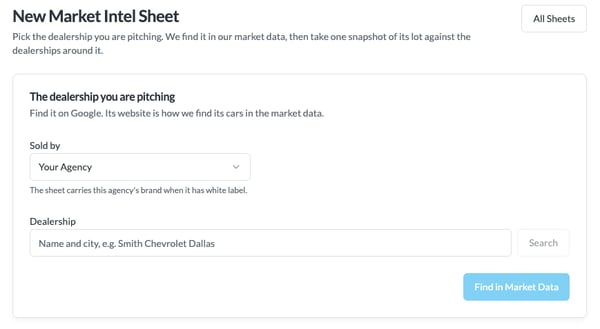
- In BuyerBridge, open Organization, then Sales Tools, then Market Intel Sheets. You'll see every sheet your agency has made.
- Click New Sheet.
- Under Sold by, pick your agency. If your agency has white label, the sheet carries your agency's brand.
- Under Dealership, enter the dealer's name and city (for example, Smith Chevrolet Dallas) and click Search.
- Click Find in Market Data. BuyerBridge uses the dealership's website to find its cars in the market data, so confirm it matched the right store.
- Compose the sheet. It takes a moment, then its status shows Ready.
Only dealers that are in the website-listings data can be run.
How to Share It
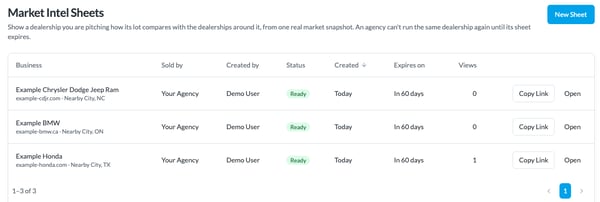
Back on the Market Intel Sheets list, click Copy Link next to the sheet to copy a link you can send to the dealer, or click Open to view it yourself. The Views column shows how many times the sheet has been opened.
How Long a Sheet Lasts
- Each sheet is good for 60 days. The Expires on column shows when.
- Your agency can't run another sheet on the same dealership until its current sheet expires.
How to Use It in a Pitch
- Lead with one finding, like the price gap against competitors or the unit that has sat the longest.
- Be clear it's a one-time snapshot, not ongoing access or a monthly report.
- To track the dealer every month, with focus vehicle report pages and Demand & Ad Fit, add Market Intelligence to their account once they sign.