---
title: How to Use the Channel Settings Panel
description: Use the Channel Settings panel in BuyerBridge to check a client's Meta, Snapchat, TikTok, Pinterest and Google assets and start channel setup.
---
[Skip to content](https://support.buyerbridge.com/knowledge/how-to-use-the-channel-settings-panel#main-content)
English
Show submenu for translations
[Submit a ticket](https://support.buyerbridge.com/knowledge/kb-tickets/new?hsLang=en)
![BuyerBridge\_LOGO-dark-2.png\]](https://support.buyerbridge.com/hs-fs/hubfs/BuyerBridge_LOGO-dark-2.png?height=40&name=BuyerBridge_LOGO-dark-2.png)
Open main navigation
Close main navigation
- English
Show submenu for translations
- [Submit a ticket](https://support.buyerbridge.com/knowledge/kb-tickets/new)
- Go to buyerbridge.com
Go to buyerbridge.com
Welcome to the BuyerBridge Help Center!
- There are no suggestions because the search field is empty.
1. [Help Center](https://support.buyerbridge.com/knowledge?hsLang=en)
2. [Getting Started](https://support.buyerbridge.com/knowledge/getting-started?hsLang=en)
3. [Navigating the Platform](https://support.buyerbridge.com/knowledge/getting-started?hsLang=en#navigating-the-platform)
# How to Use the Channel Settings Panel
## Check a client's ad accounts, pixels, catalogs and Google setup in one panel, and start setup for any channel the client doesn't have yet.
The Channel Settings panel shows how a client account is connected on each ad channel. Links in the panel open the asset straight in the channel's own business tools, so you skip the hunt through menus.
### Quick Links
- [How to Open Channel Settings](https://support.buyerbridge.com/knowledge/how-to-use-the-channel-settings-panel#open)
- [Meta Tab](https://support.buyerbridge.com/knowledge/how-to-use-the-channel-settings-panel#meta)
- [Snapchat, TikTok and Pinterest Tabs](https://support.buyerbridge.com/knowledge/how-to-use-the-channel-settings-panel#snapchat-tiktok-pinterest)
- [Google Tab](https://support.buyerbridge.com/knowledge/how-to-use-the-channel-settings-panel#google)
- [Channels the Client Doesn't Have Yet](https://support.buyerbridge.com/knowledge/how-to-use-the-channel-settings-panel#not-enrolled)
### How to Open Channel Settings
1. Pick the client in the account dropdown at the top of the page.
2. Click the sliders icon in the top bar. On a small screen, open the **⋮** menu and choose **Channel settings**.
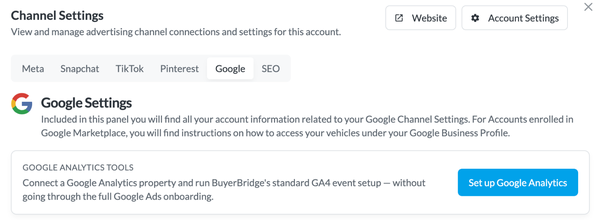
The panel opens on the right. **Website** opens the client's site in a new tab, and **Account Settings** opens the client's settings page.
The tabs are **Meta**, **Snapchat**, **TikTok**, **Pinterest**, **Google** and **SEO**. Agencies with Reddit also see a **Reddit** tab.
💡 Note: Channel Settings is for agency users. Client logins don't see it.
### Meta Tab
Buttons at the top of the tab:
- **Business Manager access**: shows whether your connection user has access to the client's Business Manager. Click it for details, such as **You need to accept the invitation!**
- **Assign Permissions**: give your user access to the client's assets. Pick **All Assets**, or choose the Page, Ad Account, Pixel or Catalogs one by one.
- **Alerts**: open alerts for the account.
Below the buttons, one card per asset:
- **Page**: the Facebook Page the account uses.
- **Ad Account**: links to the ad account, plus **Billing**, **Payment Settings**, **Audiences** and **Reporting**.
- **Pixels**: the client's pixel.
- **Catalog(s)**: the vehicle catalog, plus **Data Sources** and **Events**.
- **Google Links**: a shortcut to the client's Google Analytics.
Each asset card shows whether your user has permission and has a **BM Settings** button that opens the asset in Business Manager.
### Snapchat, TikTok and Pinterest Tabs
These tabs list the client's **Ad Account**, **Pixel** and **Catalog**. Click any of them to open it in that channel's business tools. **Still being set up** means the asset isn't connected yet.
### Google Tab
- **Google Analytics Tools**: click **Set up Google Analytics** to connect a Google Analytics property and run BuyerBridge's standard GA4 event setup, without the full Google Ads onboarding.
- **Google Vehicle Listings**: if the account still needs a linked Merchant Center feed and a Business Profile store code, click **Set up Vehicle Listings**. Once it's done, the card says **You are all set up on Google Vehicle Listings!** and **Manage Assets** lets you change them.
To see the listings, search for the dealership on Google and scroll to **Cars for sale** on its Business Profile. The card has a link that runs the search for you. Listings can take up to 72 hours to show.
### Channels the Client Doesn't Have Yet
When the client isn't on a channel, its tab says so and shows a card for that channel. Click **Setup** to start onboarding. When the button reads **Authenticate & Setup**, BuyerBridge asks you to connect your agency to the channel first.
### Continue Learning
- [BuyerBridge Dashboard Tour](https://support.buyerbridge.com/knowledge/buyerbridge-dashboard-tour?hsLang=en)
- [How to Onboard Client Accounts to Any Channel](https://support.buyerbridge.com/knowledge/how-to-onboard-client-accounts-to-any-channel?hsLang=en)
- [How to Connect Your Agency to a New Channel](https://support.buyerbridge.com/knowledge/omnichannel-authentication?hsLang=en)
- [How BuyerBridge Sets Up Google VLAs](https://support.buyerbridge.com/knowledge/how-to-setup-google-vehicle-listing-ads?hsLang=en)
- [Google Analytics Tracking](https://support.buyerbridge.com/knowledge/google-analytics-tracking?hsLang=en)
- [Getting Started](https://support.buyerbridge.com/knowledge/getting-started?hsLang=en#main-content)
- [Welcome Kit](https://support.buyerbridge.com/knowledge/getting-started?hsLang=en#welcome-kit)
- [Navigating the Platform](https://support.buyerbridge.com/knowledge/getting-started?hsLang=en#navigating-the-platform)
- [Account Management](https://support.buyerbridge.com/knowledge/getting-started?hsLang=en#account-management)
- [Onboarding Clients](https://support.buyerbridge.com/knowledge/onboarding-clients?hsLang=en#main-content)
- [Channel Onboarding](https://support.buyerbridge.com/knowledge/onboarding-clients?hsLang=en#channel-onboarding)
- [Google Onboarding](https://support.buyerbridge.com/knowledge/onboarding-clients?hsLang=en#google-onboarding)
- [Meta Onboarding](https://support.buyerbridge.com/knowledge/onboarding-clients?hsLang=en#meta-onboarding)
- [Pinterest Onboarding](https://support.buyerbridge.com/knowledge/onboarding-clients?hsLang=en#pinterest-onboarding)
- [SEO Onboarding](https://support.buyerbridge.com/knowledge/onboarding-clients?hsLang=en#seo-onboarding)
- [Snapchat Onboarding](https://support.buyerbridge.com/knowledge/onboarding-clients?hsLang=en#snapchat-onboarding)
- [TikTok Onboarding](https://support.buyerbridge.com/knowledge/onboarding-clients?hsLang=en#tiktok-onboarding)
- [Platform Tools](https://support.buyerbridge.com/knowledge/platform-tools?hsLang=en#main-content)
- [Ad Builder](https://support.buyerbridge.com/knowledge/platform-tools?hsLang=en#ad-builder)
- [Ad Launcher](https://support.buyerbridge.com/knowledge/platform-tools?hsLang=en#ad-launcher)
- [Ads Library](https://support.buyerbridge.com/knowledge/platform-tools?hsLang=en#ads-library)
- [Best Practices](https://support.buyerbridge.com/knowledge/platform-tools?hsLang=en#best-practices)
- [Budgeting](https://support.buyerbridge.com/knowledge/platform-tools?hsLang=en#budgeting)
- [Campaign Management](https://support.buyerbridge.com/knowledge/platform-tools?hsLang=en#campaign-management)
- [EventFlow](https://support.buyerbridge.com/knowledge/platform-tools?hsLang=en#eventflow)
- [MarketAnalyzer](https://support.buyerbridge.com/knowledge/platform-tools?hsLang=en#marketanalyzer)
- [Playbooks](https://support.buyerbridge.com/knowledge/platform-tools?hsLang=en#playbooks)
- [SEOFlow](https://support.buyerbridge.com/knowledge/platform-tools?hsLang=en#seoflow)
- [Reports](https://support.buyerbridge.com/knowledge/platform-tools?hsLang=en#reports)
- [VINFlow](https://support.buyerbridge.com/knowledge/platform-tools?hsLang=en#vinflow)
- [White Labeling](https://support.buyerbridge.com/knowledge/platform-tools?hsLang=en#white-labeling)
- [Market Intelligence](https://support.buyerbridge.com/knowledge/platform-tools?hsLang=en#market-intelligence)
- [Multichannel Advertising](https://support.buyerbridge.com/knowledge/multichannel-advertising?hsLang=en#main-content)
- [Overview](https://support.buyerbridge.com/knowledge/multichannel-advertising?hsLang=en#overview)
- [Google](https://support.buyerbridge.com/knowledge/multichannel-advertising?hsLang=en#google)
- [Meta](https://support.buyerbridge.com/knowledge/multichannel-advertising?hsLang=en#meta)
- [Pinterest](https://support.buyerbridge.com/knowledge/multichannel-advertising?hsLang=en#pinterest)
- [Snapchat](https://support.buyerbridge.com/knowledge/multichannel-advertising?hsLang=en#snapchat)
- [TikTok](https://support.buyerbridge.com/knowledge/multichannel-advertising?hsLang=en#tiktok)
- [Agency Sales Assets](https://support.buyerbridge.com/knowledge/agency-sales-assets?hsLang=en#main-content)
- [Facebook Sales Assets](https://support.buyerbridge.com/knowledge/agency-sales-assets?hsLang=en#facebook-sales-assets)
- [Google Sales Assets](https://support.buyerbridge.com/knowledge/agency-sales-assets?hsLang=en#google-sales-assets)
- [Graphics & Web Elements](https://support.buyerbridge.com/knowledge/agency-sales-assets?hsLang=en#graphics-web-elements)
- [Instagram Sales Assets](https://support.buyerbridge.com/knowledge/agency-sales-assets?hsLang=en#instagram-sales-assets)
- [Meta Sales Assets](https://support.buyerbridge.com/knowledge/agency-sales-assets?hsLang=en#meta-sales-assets)
- [Omnichannel Sales Assets](https://support.buyerbridge.com/knowledge/agency-sales-assets?hsLang=en#omnichannel-sales-assets)
- [Pinterest Sales Assets](https://support.buyerbridge.com/knowledge/agency-sales-assets?hsLang=en#pinterest-sales-assets)
- [Snapchat Sales Assets](https://support.buyerbridge.com/knowledge/agency-sales-assets?hsLang=en#snapchat-sales-assets)
- [TikTok Sales Assets](https://support.buyerbridge.com/knowledge/agency-sales-assets?hsLang=en#tiktok-sales-assets)
- [SEO for Dealers](https://support.buyerbridge.com/knowledge/agency-sales-assets?hsLang=en#seo-for-dealers)
- [Product Updates & Enhancements](https://support.buyerbridge.com/knowledge/product-updates-enhancements?hsLang=en#main-content)
- [Enhancements](https://support.buyerbridge.com/knowledge/product-updates-enhancements?hsLang=en#enhancements)
- [Product Updates](https://support.buyerbridge.com/knowledge/product-updates-enhancements?hsLang=en#product-updates)
- [Announcements](https://support.buyerbridge.com/knowledge/product-updates-enhancements?hsLang=en#announcements)
- [Metrics](https://support.buyerbridge.com/knowledge/metrics?hsLang=en#main-content)
- [Offline Events](https://support.buyerbridge.com/knowledge/metrics?hsLang=en#offline-events)
- [Metrics Defined](https://support.buyerbridge.com/knowledge/metrics?hsLang=en#metrics-defined)
- [Leads](https://support.buyerbridge.com/knowledge/metrics?hsLang=en#leads)
- [Reporting](https://support.buyerbridge.com/knowledge/metrics?hsLang=en#reporting)
- [SEO Reporting](https://support.buyerbridge.com/knowledge/metrics?hsLang=en#seo-reporting)
- [Supported Providers](https://support.buyerbridge.com/knowledge/supported-providers?hsLang=en#main-content)
- [CRM Integrations](https://support.buyerbridge.com/knowledge/supported-providers?hsLang=en#crm-integrations)
- [Inventory & Feed Providers](https://support.buyerbridge.com/knowledge/supported-providers?hsLang=en#inventory-feed-providers)
- [Website Providers](https://support.buyerbridge.com/knowledge/supported-providers?hsLang=en#website-providers)
- [3rd Party Support](https://support.buyerbridge.com/knowledge/3rd-party-support?hsLang=en#main-content)
- [Facebook Platform Help](https://support.buyerbridge.com/knowledge/3rd-party-support?hsLang=en#facebook-platform-help)
[](https://buyerbridge.com/)
buyerbridge.com | Help Center
Copyright © 2026, Dealers United