---
title: How to Use the Inventory Details Page
description: Use Inventory Details in BuyerBridge to see a client's vehicles, which channels advertise them, filtered vehicles and catalog export URLs.
---
[Skip to content](https://support.buyerbridge.com/knowledge/how-to-use-the-inventory-details-page#main-content)
English
Show submenu for translations
[Submit a ticket](https://support.buyerbridge.com/knowledge/kb-tickets/new?hsLang=en)
![BuyerBridge\_LOGO-dark-2.png\]](https://support.buyerbridge.com/hs-fs/hubfs/BuyerBridge_LOGO-dark-2.png?height=40&name=BuyerBridge_LOGO-dark-2.png)
Open main navigation
Close main navigation
- English
Show submenu for translations
- [Submit a ticket](https://support.buyerbridge.com/knowledge/kb-tickets/new)
- Go to buyerbridge.com
Go to buyerbridge.com
Welcome to the BuyerBridge Help Center!
- There are no suggestions because the search field is empty.
1. [Help Center](https://support.buyerbridge.com/knowledge?hsLang=en)
2. [Getting Started](https://support.buyerbridge.com/knowledge/getting-started?hsLang=en)
3. [Navigating the Platform](https://support.buyerbridge.com/knowledge/getting-started?hsLang=en#navigating-the-platform)
# How to Use the Inventory Details Page
## See every vehicle in a client's feed, which channels advertise it, and why a vehicle is filtered out.
Inventory Details lists every vehicle in a client's inventory feed and shows which ad channels are advertising it. Use it to check a new feed, find out why a vehicle isn't in ads, or grab a channel's catalog export URL.
### Quick Links
- [Where to Find Inventory Details](https://support.buyerbridge.com/knowledge/how-to-use-the-inventory-details-page#find)
- [Inventory Analysis](https://support.buyerbridge.com/knowledge/how-to-use-the-inventory-details-page#analysis)
- [Channel Activation](https://support.buyerbridge.com/knowledge/how-to-use-the-inventory-details-page#channel-activation)
- [The Vehicle Table](https://support.buyerbridge.com/knowledge/how-to-use-the-inventory-details-page#vehicle-table)
- [Catalog Exports](https://support.buyerbridge.com/knowledge/how-to-use-the-inventory-details-page#catalog-exports)
- [Data Sources](https://support.buyerbridge.com/knowledge/how-to-use-the-inventory-details-page#data-sources)
### Where to Find Inventory Details
1. Pick the client in the account dropdown at the top of the page.
2. In the left menu, open **Inventory** and click **Details**.
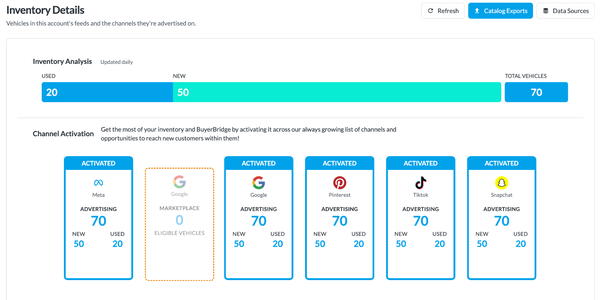
Three buttons sit at the top right: **Refresh** reloads the inventory, **Catalog Exports** opens the export URLs, and **Data Sources** jumps to the feed settings at the bottom of the page.
### Inventory Analysis
The bar splits the client's vehicles into **Used** and **New**, with **Total Vehicles** on the right.
### Channel Activation
Each channel the client has gets a card:
- **Activated**: the channel is advertising inventory. The card shows how many vehicles it's advertising, split into New and Used.
- **Attention**: something in the channel's setup needs finishing.
- **Filtered**: vehicles left out of that channel's catalog. Click it to see each reason with a count, then click **view** to filter the table to those vehicles.
Dashed cards are channels that can't advertise inventory yet. The note under the card says what's missing, for example **Complete onboarding to activate this channel**.
### The Vehicle Table
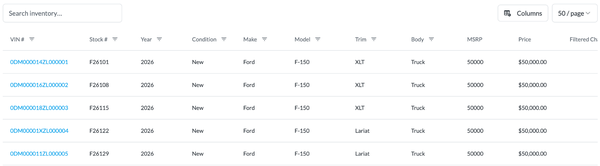
- **Search inventory…**: type to search the vehicle list.
- Filter icons in the column headers narrow the table. Active filters show as chips next to **Filtered by:**, with **Clear all** to reset.
- **Columns**: add or hide columns, such as Mileage, Days On Lot, Date Added or Features.
- The page size menu shows 10, 20 or 50 vehicles per page.
- **Filtered Channel** and **Filtered Reason** show where a vehicle was left out and why.
- **VDP** opens the vehicle's page on the client's website. **View** in the Details column opens the full vehicle record.
### Catalog Exports
Click **Catalog Exports** to see the export URL BuyerBridge builds for each advertising channel, and copy the one you need.
### Data Sources
The **Data Sources** card at the bottom of the page shows where the client's inventory comes from. Click **Refresh** there to pull the feed again.
💡 Tip: If the page asks **Are you getting the most out of your inventory?**, the account doesn't have an inventory product yet. Pick a channel on that screen to add one.
### Continue Learning
- [VINFlow 101: Starting Guide](https://support.buyerbridge.com/knowledge/vinflow-101-starting-guide?hsLang=en)
- [How to Create a Product Set (Step-by-Step)](https://support.buyerbridge.com/knowledge/how-to-create-a-product-set-step-by-step?hsLang=en)
- [Managing Feed Providers](https://support.buyerbridge.com/knowledge/managing-feed-providers?hsLang=en)
- [Supported Inventory Feed Providers](https://support.buyerbridge.com/knowledge/supported-inventory-feed-providers?hsLang=en)
- [BuyerBridge Dashboard Tour](https://support.buyerbridge.com/knowledge/buyerbridge-dashboard-tour?hsLang=en)
- [Getting Started](https://support.buyerbridge.com/knowledge/getting-started?hsLang=en#main-content)
- [Welcome Kit](https://support.buyerbridge.com/knowledge/getting-started?hsLang=en#welcome-kit)
- [Navigating the Platform](https://support.buyerbridge.com/knowledge/getting-started?hsLang=en#navigating-the-platform)
- [Account Management](https://support.buyerbridge.com/knowledge/getting-started?hsLang=en#account-management)
- [Onboarding Clients](https://support.buyerbridge.com/knowledge/onboarding-clients?hsLang=en#main-content)
- [Channel Onboarding](https://support.buyerbridge.com/knowledge/onboarding-clients?hsLang=en#channel-onboarding)
- [Google Onboarding](https://support.buyerbridge.com/knowledge/onboarding-clients?hsLang=en#google-onboarding)
- [Meta Onboarding](https://support.buyerbridge.com/knowledge/onboarding-clients?hsLang=en#meta-onboarding)
- [Pinterest Onboarding](https://support.buyerbridge.com/knowledge/onboarding-clients?hsLang=en#pinterest-onboarding)
- [SEO Onboarding](https://support.buyerbridge.com/knowledge/onboarding-clients?hsLang=en#seo-onboarding)
- [Snapchat Onboarding](https://support.buyerbridge.com/knowledge/onboarding-clients?hsLang=en#snapchat-onboarding)
- [TikTok Onboarding](https://support.buyerbridge.com/knowledge/onboarding-clients?hsLang=en#tiktok-onboarding)
- [Platform Tools](https://support.buyerbridge.com/knowledge/platform-tools?hsLang=en#main-content)
- [Ad Builder](https://support.buyerbridge.com/knowledge/platform-tools?hsLang=en#ad-builder)
- [Ad Launcher](https://support.buyerbridge.com/knowledge/platform-tools?hsLang=en#ad-launcher)
- [Ads Library](https://support.buyerbridge.com/knowledge/platform-tools?hsLang=en#ads-library)
- [Best Practices](https://support.buyerbridge.com/knowledge/platform-tools?hsLang=en#best-practices)
- [Budgeting](https://support.buyerbridge.com/knowledge/platform-tools?hsLang=en#budgeting)
- [Campaign Management](https://support.buyerbridge.com/knowledge/platform-tools?hsLang=en#campaign-management)
- [EventFlow](https://support.buyerbridge.com/knowledge/platform-tools?hsLang=en#eventflow)
- [MarketAnalyzer](https://support.buyerbridge.com/knowledge/platform-tools?hsLang=en#marketanalyzer)
- [Playbooks](https://support.buyerbridge.com/knowledge/platform-tools?hsLang=en#playbooks)
- [SEOFlow](https://support.buyerbridge.com/knowledge/platform-tools?hsLang=en#seoflow)
- [Reports](https://support.buyerbridge.com/knowledge/platform-tools?hsLang=en#reports)
- [VINFlow](https://support.buyerbridge.com/knowledge/platform-tools?hsLang=en#vinflow)
- [White Labeling](https://support.buyerbridge.com/knowledge/platform-tools?hsLang=en#white-labeling)
- [Market Intelligence](https://support.buyerbridge.com/knowledge/platform-tools?hsLang=en#market-intelligence)
- [Multichannel Advertising](https://support.buyerbridge.com/knowledge/multichannel-advertising?hsLang=en#main-content)
- [Overview](https://support.buyerbridge.com/knowledge/multichannel-advertising?hsLang=en#overview)
- [Google](https://support.buyerbridge.com/knowledge/multichannel-advertising?hsLang=en#google)
- [Meta](https://support.buyerbridge.com/knowledge/multichannel-advertising?hsLang=en#meta)
- [Pinterest](https://support.buyerbridge.com/knowledge/multichannel-advertising?hsLang=en#pinterest)
- [Snapchat](https://support.buyerbridge.com/knowledge/multichannel-advertising?hsLang=en#snapchat)
- [TikTok](https://support.buyerbridge.com/knowledge/multichannel-advertising?hsLang=en#tiktok)
- [Agency Sales Assets](https://support.buyerbridge.com/knowledge/agency-sales-assets?hsLang=en#main-content)
- [Facebook Sales Assets](https://support.buyerbridge.com/knowledge/agency-sales-assets?hsLang=en#facebook-sales-assets)
- [Google Sales Assets](https://support.buyerbridge.com/knowledge/agency-sales-assets?hsLang=en#google-sales-assets)
- [Graphics & Web Elements](https://support.buyerbridge.com/knowledge/agency-sales-assets?hsLang=en#graphics-web-elements)
- [Instagram Sales Assets](https://support.buyerbridge.com/knowledge/agency-sales-assets?hsLang=en#instagram-sales-assets)
- [Meta Sales Assets](https://support.buyerbridge.com/knowledge/agency-sales-assets?hsLang=en#meta-sales-assets)
- [Omnichannel Sales Assets](https://support.buyerbridge.com/knowledge/agency-sales-assets?hsLang=en#omnichannel-sales-assets)
- [Pinterest Sales Assets](https://support.buyerbridge.com/knowledge/agency-sales-assets?hsLang=en#pinterest-sales-assets)
- [Snapchat Sales Assets](https://support.buyerbridge.com/knowledge/agency-sales-assets?hsLang=en#snapchat-sales-assets)
- [TikTok Sales Assets](https://support.buyerbridge.com/knowledge/agency-sales-assets?hsLang=en#tiktok-sales-assets)
- [SEO for Dealers](https://support.buyerbridge.com/knowledge/agency-sales-assets?hsLang=en#seo-for-dealers)
- [Product Updates & Enhancements](https://support.buyerbridge.com/knowledge/product-updates-enhancements?hsLang=en#main-content)
- [Enhancements](https://support.buyerbridge.com/knowledge/product-updates-enhancements?hsLang=en#enhancements)
- [Product Updates](https://support.buyerbridge.com/knowledge/product-updates-enhancements?hsLang=en#product-updates)
- [Announcements](https://support.buyerbridge.com/knowledge/product-updates-enhancements?hsLang=en#announcements)
- [Metrics](https://support.buyerbridge.com/knowledge/metrics?hsLang=en#main-content)
- [Offline Events](https://support.buyerbridge.com/knowledge/metrics?hsLang=en#offline-events)
- [Metrics Defined](https://support.buyerbridge.com/knowledge/metrics?hsLang=en#metrics-defined)
- [Leads](https://support.buyerbridge.com/knowledge/metrics?hsLang=en#leads)
- [Reporting](https://support.buyerbridge.com/knowledge/metrics?hsLang=en#reporting)
- [SEO Reporting](https://support.buyerbridge.com/knowledge/metrics?hsLang=en#seo-reporting)
- [Supported Providers](https://support.buyerbridge.com/knowledge/supported-providers?hsLang=en#main-content)
- [CRM Integrations](https://support.buyerbridge.com/knowledge/supported-providers?hsLang=en#crm-integrations)
- [Inventory & Feed Providers](https://support.buyerbridge.com/knowledge/supported-providers?hsLang=en#inventory-feed-providers)
- [Website Providers](https://support.buyerbridge.com/knowledge/supported-providers?hsLang=en#website-providers)
- [3rd Party Support](https://support.buyerbridge.com/knowledge/3rd-party-support?hsLang=en#main-content)
- [Facebook Platform Help](https://support.buyerbridge.com/knowledge/3rd-party-support?hsLang=en#facebook-platform-help)
[](https://buyerbridge.com/)
buyerbridge.com | Help Center
Copyright © 2026, Dealers United