![BuyerBridge_LOGO-dark-2.png]](https://support.buyerbridge.com/hs-fs/hubfs/BuyerBridge_LOGO-dark-2.png?height=40&name=BuyerBridge_LOGO-dark-2.png)
Meta Budgeting gives your team a faster, clearer way to manage budgets inside the app. With it, you can review pacing, spot suggested changes, turn on auto-pacing, distribute adjustments, and track recent updates in the Change Log.
This guide walks through where to find the tool and how its main features work together.
Quick Links
- How to Find Meta Budgeting in BuyerBridge
- What Is Meta Budgeting?
- Breaking Down the Meta Budgeting Landing Page
- How Pacing Works
- How to Use Auto-Pacing
- How Budget Distribution Works
- How to Use the Change Log
- Best Practices for Meta Budgeting
What Is Meta Budgeting?
Meta Budgeting is BuyerBridge’s budget management tool for Meta campaigns.
It helps review campaign pacing, compare projected spend to monthly goals, and make budget changes faster without relying on manual checks alone.
The tool is built to give your team more visibility into budget performance throughout the month while making it easier to stay on track and document changes.
How to Find Meta Budgeting in BuyerBridge
To access Meta Budgeting in BuyerBridge:
- Log in to BuyerBridge.
- Scroll down to Organization section in the left-hand menu.
- Expand the Reports dropdown.
- Scroll to Meta and expand options
- Select Meta Budgeting.
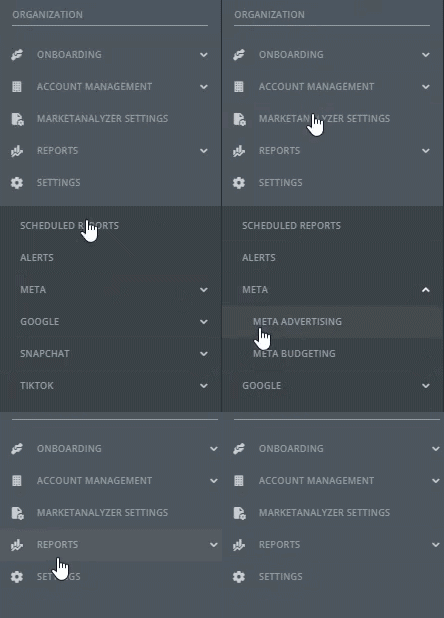
Once you are inside the tool, you can review pacing, monitor suggested changes, manage budget updates, and check the Change Log.
Breaking Down the Meta Budgeting View
When you open Meta Budgeting, you’ll land on the main budgeting view. This page gives you a quick look at how campaigns are pacing, where budgets may need attention, and what changes may be needed next.
Depending on your setup, you may see details like:
- Monthly budget goals
- Current daily budget
- Projected spend
- Average daily spend
- Suggested budget changes
This view is designed to help your team quickly understand what is on track, what is off pace, and where action may be needed.
How Pacing Works
Pacing helps show whether a campaign is on track toward its monthly budget goal.
This makes it easier to catch overpacing or underpacing before it turns into a bigger issue later in the month.
By reviewing pacing regularly, your team can make smaller adjustments throughout the month instead of reacting all at once at the end.
🔗 Read more: What Auto-Pacing Does in Meta Budgeting
How to Use Auto-Pacing
Auto-pacing helps keep eligible campaigns closer to their monthly budget goals with less manual work.
When auto-pacing is turned on, BuyerBridge can automatically adjust campaign budgets based on pacing. Auto-pacing updates once per day, which helps keep campaigns moving toward goal without making overly frequent changes.
To use auto-pacing, you’ll need to set a monthly goal for each campaign you want paced.
An account-level monthly budget goal is helpful for overall visibility, but it does not turn on auto-pacing across multiple campaigns by itself.
Auto-pacing is built to support day-to-day budget management while still keeping your team in control.
🔗 Read more: What Auto-Pacing Does in Meta Budgeting
How Budget Distribution Works
If budgets need to be adjusted across campaigns, BuyerBridge can help distribute those changes for you.
Adjustments can be distributed:
- Proportionally
- Evenly
This gives your team a faster way to apply budget changes across campaigns without recalculating each one by hand.
How Suggestions Help
Suggestions help surface campaigns that may need a budget increase or decrease based on current pacing.
These recommendations are designed to help your team move faster. They give you a starting point for budget decisions while still leaving strategic control in your hands.
Suggestions can help your team spot pacing issues earlier and reduce the amount of manual checking needed throughout the month.
How to Use the Change Log
The Change Log is where your team can review budget updates made in Meta Budgeting.
This helps you see what changed and when, making it easier to stay aligned across team members and review recent activity.
The Change Log is especially useful when multiple people are managing budgets or when you want a clear record of recent updates.
Read more: How the Meta Budgeting Change Log Works
Best Practices for Meta Budgeting
To get the most out of Meta Budgeting, we recommend:
- Set an account-level goal for overall visibility.
- Set campaign-level goals for any campaigns you want to auto-pace.
- Review pacing regularly throughout the month.
- Use suggestions to speed up budget decisions.
- Use proportional or even distribution when campaign budgets need to be adjusted.
- Check the Change Log after major updates.
These habits can help your team stay more proactive and avoid last-minute budget changes.
Next Steps
Now that you’ve got the overview, here are the best next articles to read:
- What Auto-Pacing Does in Meta Budgeting →
- How the Meta Budgeting Change Log Works →