![BuyerBridge_LOGO-dark-2.png]](https://support.buyerbridge.com/hs-fs/hubfs/BuyerBridge_LOGO-dark-2.png?height=40&name=BuyerBridge_LOGO-dark-2.png)
The Advertising report shows advertising results for every client account in your organization, one channel at a time. Use it to spot accounts that need attention, compare clients side by side and export the numbers.
Quick Links
- Where to Find the Report
- Run a Report
- Filters
- Reading the Results
- Export and Open in the Ad Platform
Where to Find the Report
- In the left menu, under Organization, open Reports.
- Click Advertising.
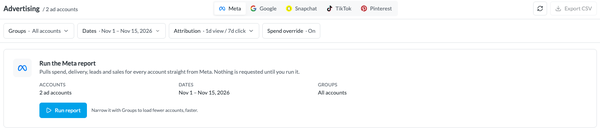
- Pick a channel at the top: Meta, Google, Snapchat, TikTok or Pinterest.
Run a Report
Nothing loads until you ask for it. Check the accounts, dates and groups in the summary, then click Run report. BuyerBridge pulls spend, delivery, leads and sales for each account straight from the channel. Narrow it with Groups to load fewer accounts faster.
Filters
- Groups: limit the report to one or more account groups. Changing groups resets the report. See Create Groups in Account Management.
- Dates: the reporting window.
- Attribution (Meta): how long after a click or view Meta credits a result, set separately for website leads and offline sales. The default for website results is 1-day view and 7-day click. See Facebook Lead Attributions Explained.
- Spend override: when on, spend and cost figures follow each account's spend override setting.
Reading the Results
- Agency totals (or Group totals) sum spend, leads, cost per lead, sales and clicks across the accounts.
- Needs attention flags accounts that spent with no leads, or whose cost per lead is well above the median for the report.
- Show All accounts, only accounts that need attention, or accounts with no delivery.
- Columns: choose which metrics show, or use a preset like Results only or Show all columns. Metrics differ by channel; Meta, for example, splits Website leads (off-Meta) from On-Meta leads (instant forms).
- Click a column header to sort.
For what each metric means, see Understanding Omnichannel Advertising Metrics.
Export and Open in the Ad Platform
Click Export CSV to download the report. On Meta, each account row links straight to that account in Meta Ads Manager. Use the refresh button to reload the account list and start again.
Continue Learning
- Related: How to Create Reports with Report Builder 2.0
- Related: How to Use the Playbooks Report
- Related: How to View and Manage Alerts