![BuyerBridge_LOGO-dark-2.png]](https://support.buyerbridge.com/hs-fs/hubfs/BuyerBridge_LOGO-dark-2.png?height=40&name=BuyerBridge_LOGO-dark-2.png)
Focus vehicles are the models a dealer cares about most. Pick up to three on the Focus Vehicles tab, and each one gets its own page in the dealer's report.
Quick Links
- What Are Focus Vehicles?
- How to Set a Focus Vehicle
- How to Read the Focus Vehicles Tab
- Model Variants
- How to Add Focus Vehicle Pages to a Report
What Are Focus Vehicles?
The tab has three slots. Each filled slot becomes a report page that compares the vehicle with the dealer's competitors and the wider market, trim by trim. Empty slots are left out of the report.
How to Set a Focus Vehicle
- Pick the dealer, then open Market Intelligence.
- Click the Focus Vehicles tab.
- Click Change on the slot you want to fill or replace, then choose the vehicle.
- Repeat for the other slots.
- Click Save at the top of the tab.
Important: Changes don't apply until you click Save.
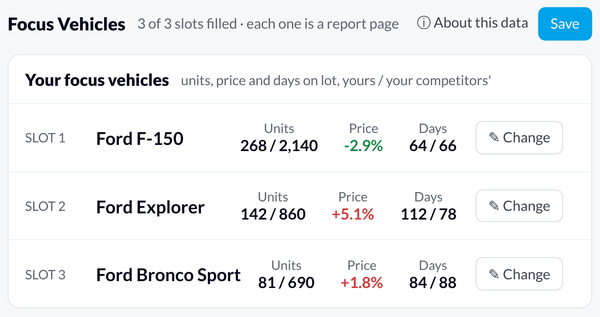
How to Read the Focus Vehicles Tab
Each slot shows the dealer's numbers next to their competitors':
- Units: the dealer's units / competitors' units.
- Price: how the dealer's price compares to competitors'.
- Days: the dealer's days on lot / competitors' days on lot.
The Report pages panel on the right lists the pages the report will include, one per filled slot.
Model Variants
Each model variant counts as its own vehicle. For example, the Ford F-150 does not include the F-150 Lightning. Pick the exact variant the dealer wants on the report.
Tip: Review focus vehicles each month before reports go out, so the pages match what the dealer is pushing.
How to Add Focus Vehicle Pages to a Report
- Make sure the dealer has at least one focus vehicle set on the Focus Vehicles tab.
- Open the dealer's report in the Report Builder and click Add Page, then Blank Page.
- Add widgets and choose a Market Intelligence: Focus Vehicle data source (1, 2, or 3) for each one. Pick Summary, Rooftops (the dealer vs. their competitors), or Trims. Use Whole Lot for a page about the dealer's whole lot.
- Make one page for each focus vehicle. Each page labels itself with the vehicle's name.
Note: If the dealer has fewer than three focus vehicles, the empty pages are left out of the PDF automatically.
Continue Learning
- Back to Hub: How to Use Market Intelligence: 101 Guide
- Related: How to Read You vs Market in Market Intelligence