---
title: Using the Page Log to Index Pages
description: Learn how to use the Page Log in SEOFlow. Track pages, request Google indexing, and enable automatic internal linking for stronger SEO.
---
[Skip to content](https://support.buyerbridge.com/knowledge/seo-automation-using-the-page-log#main-content)
English
Show submenu for translations
[Submit a ticket](https://support.buyerbridge.com/knowledge/kb-tickets/new?hsLang=en)
![BuyerBridge\_LOGO-dark-2.png\]](https://support.buyerbridge.com/hs-fs/hubfs/BuyerBridge_LOGO-dark-2.png?height=40&name=BuyerBridge_LOGO-dark-2.png)
Open main navigation
Close main navigation
- English
Show submenu for translations
- [Submit a ticket](https://support.buyerbridge.com/knowledge/kb-tickets/new)
- Go to buyerbridge.com
Go to buyerbridge.com
Welcome to the BuyerBridge Help Center!
- There are no suggestions because the search field is empty.
1. [Help Center](https://support.buyerbridge.com/knowledge?hsLang=en)
2. [Platform Tools](https://support.buyerbridge.com/knowledge/platform-tools?hsLang=en)
3. [SEOFlow](https://support.buyerbridge.com/knowledge/platform-tools?hsLang=en#seoflow)
# Using the Page Log to Index Pages
## How to Ensure Your Web Page is Indexed by Google for SEO Success
The Page Log is a critical feature in SEOFlow that ensures every page your agency creates is tracked, indexed, and leveraged for stronger SEO results. Each time you generate a page in SEOFlow, an entry is automatically created in the Page Log.
Once you publish the page to the dealership’s website, return to the Page log where you add the live URL, which allows SEOFlow to:
- Request indexing directly from Google (no need to log into Google Search Console every time to crawl a new page)
- Monitor that Google indexing status right from the app
- Ensure your articles are automatically interlinked for maximum topical authority
This guide explains what the Page Log is, why it matters for SEO, and how to use it effectively.
**Quick Links**
- [How to Find the Page Log](https://support.buyerbridge.com/knowledge/seo-automation-using-the-page-log#how_to_find)
- [What Is the Page Log?](https://support.buyerbridge.com/knowledge/seo-automation-using-the-page-log#what_is_the_page_log)
- [Why the Page Log Matters](https://support.buyerbridge.com/knowledge/seo-automation-using-the-page-log#why_page_log_matters)
- [How to Use the Page Log](https://support.buyerbridge.com/knowledge/seo-automation-using-the-page-log#how_to_use_page_log)
- [Best Practices for Agencies](https://support.buyerbridge.com/knowledge/seo-automation-using-the-page-log#best_practices)
---
### How to Find the Page Log
You can access the Page Log directly inside the BuyerBridge app:
1. Log in to **BuyerBridge.**
2. From the main navigation, click on the **SEO tab.**
3. Expand the options under SEO.
4. Select **Page Log** from the dropdown.
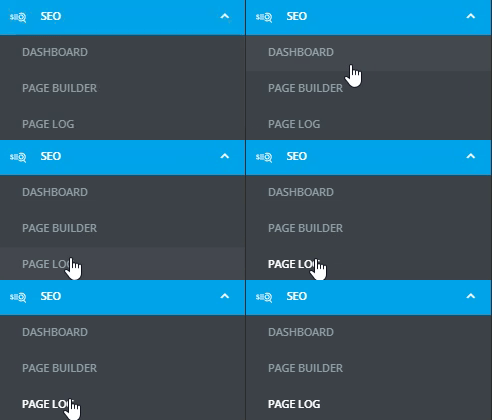
This will open the full Page Log view, where you can see all generated pages, add live URLs, and track indexing and interlinking.
---
### What Is the Page Log?
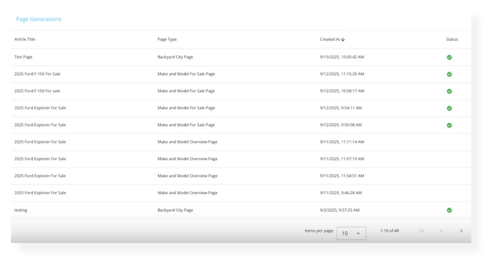
The Page Log is your centralized record of every page created in SEOFlow.
By default, every page you generate is automatically added here. To index the page with Google, copy + paste the live URL, and add it to the page log.
Now, the log becomes the foundation of your SEO strategy because it tracks pages built, pages published, pushes content to Google for indexing, and identifies what needs attention, all in one location.
---
### Why the Page Log Matters
The Page Log isn’t just a list of pages. It powers the automation across the entire platform:
- **Indexing Support** – Once a live URL is added, SEOFlow can request indexing to speed up visibility.
- **Automatic Interlinking** – Logged pages are used as internal linking targets in future builds (it brings all the Hub and Spoke articles together).
For example, an Info Page on “Ford F-150 towing capacity” will link back to the main *2025 Ford F-150 Overview* page if its URL is logged.
- **Performance Tracking** – With URLs added, these pages also show up in SEO reporting and insights, helping you measure impact over time.
---
### How to Use the Page Log
1. [Generate a Page](https://support.buyerbridge.com/knowledge/page-builder-101-the-4-core-dealership-pages?hsLang=en): Build a Make/Model Overview, Make/Model For Sale, Informational Article, or Backyard page in the Page Builder. **A log entry will be created automatically.**
2. Publish the Page to the Dealer’s Website: Add the content to the dealer’s live site.
3. **Return to the Page Log**: Access the Page Log from the SEOFlow navigation.
4. Add the URL: **Enter the live page URL into the log entry**.
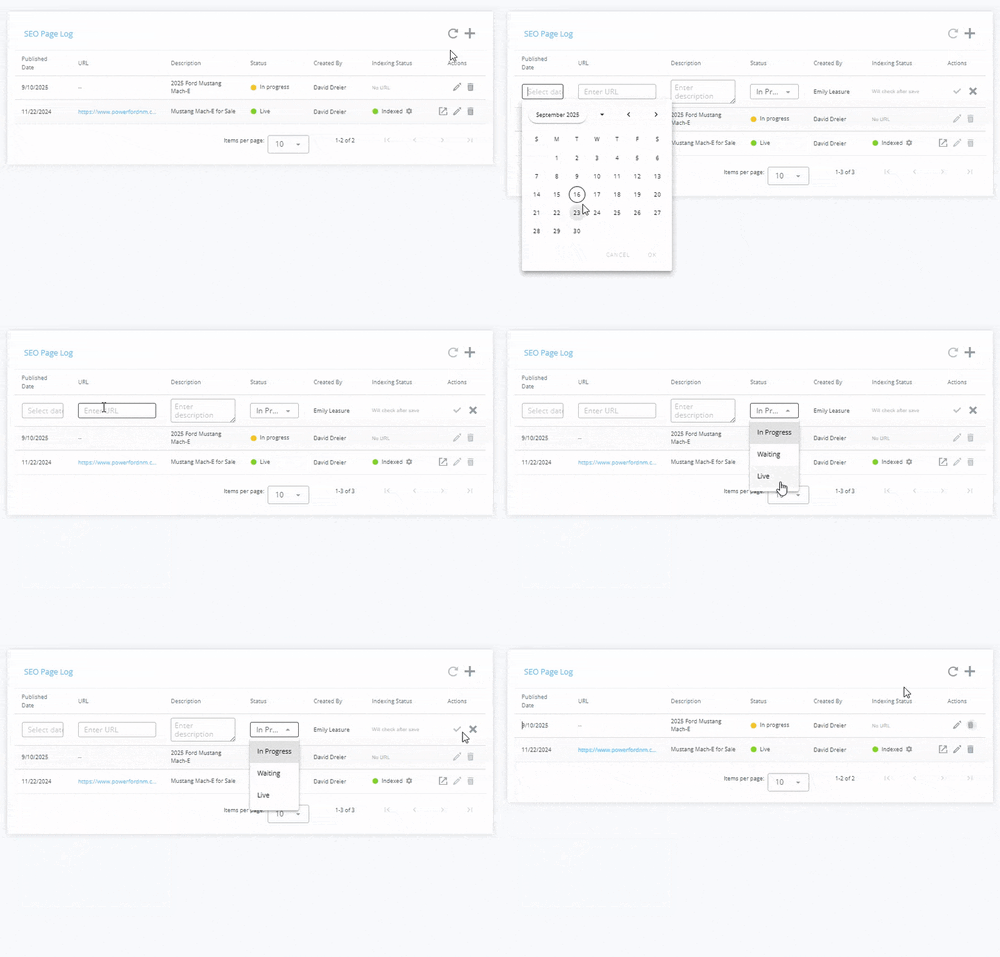
5. Track Indexing: SEOFlow checks if the page is indexed in Google and requests indexing if necessary.
6. Enable Linking: With the URL saved, SEOFlow will automatically interlink future Info pages and related builds to that page.
---
### Best Practices for Agencies
- Always add live URLs immediately after publishing a page, ensuring indexing requests can be made right away.
- Use Make/Model Overview pages as content pillars. **Logging their URLs first** ensures Info pages will link back to them automatically, boosting SEO for both.
- Audit the Page Log regularly to confirm pages are indexed and links remain accurate.
- Educate dealers that updating the Page Log keeps their SEO foundation strong, making reporting and results more impactful.
---
### FAQs
#### Q: Can I edit the page builder content in the app?
A: No. Once the code is generated, copy-paste the HTML into the dealer's CMS (DealerOn, DealerInspire, Dealer.com), and from there, content sections can be added, deleted, or removed.
#### **Q**: Does Google always index my new page?
A: No. Google doesn't automatically crawl every new page built and launched. Page log ensures the indexing request has been submitted and monitors for any indexing issues right from BuyerBridge.
---
#### Next Steps
Now that you understand how to use the Page Log, continue building out your SEOFlow workflow:
- [Unpacking the SEOFlow Dashboard →](https://support.buyerbridge.com/knowledge/unpacking-the-seoflow-dashboard?hsLang=en)
- [Intro to the Page Builder →](https://support.buyerbridge.com/knowledge/page-builder-101-the-4-core-dealership-pages?hsLang=en)
- How to Create Reports in SEOFlow →
- [Getting Started](https://support.buyerbridge.com/knowledge/getting-started?hsLang=en#main-content)
- [Welcome Kit](https://support.buyerbridge.com/knowledge/getting-started?hsLang=en#welcome-kit)
- [Getting Started](https://support.buyerbridge.com/knowledge/getting-started?hsLang=en#getting-started)
- [Navigating the Platform](https://support.buyerbridge.com/knowledge/getting-started?hsLang=en#navigating-the-platform)
- [Account Management](https://support.buyerbridge.com/knowledge/getting-started?hsLang=en#account-management)
- [Onboarding Clients](https://support.buyerbridge.com/knowledge/onboarding-clients?hsLang=en#main-content)
- [Channel Onboarding](https://support.buyerbridge.com/knowledge/onboarding-clients?hsLang=en#channel-onboarding)
- [Google Onboarding](https://support.buyerbridge.com/knowledge/onboarding-clients?hsLang=en#google-onboarding)
- [Meta Onboarding](https://support.buyerbridge.com/knowledge/onboarding-clients?hsLang=en#meta-onboarding)
- [Pinterest Onboarding](https://support.buyerbridge.com/knowledge/onboarding-clients?hsLang=en#pinterest-onboarding)
- [SEO Onboarding](https://support.buyerbridge.com/knowledge/onboarding-clients?hsLang=en#seo-onboarding)
- [Snapchat Onboarding](https://support.buyerbridge.com/knowledge/onboarding-clients?hsLang=en#snapchat-onboarding)
- [TikTok Onboarding](https://support.buyerbridge.com/knowledge/onboarding-clients?hsLang=en#tiktok-onboarding)
- [Platform Tools](https://support.buyerbridge.com/knowledge/platform-tools?hsLang=en#main-content)
- [Ad Builder](https://support.buyerbridge.com/knowledge/platform-tools?hsLang=en#ad-builder)
- [Ad Launcher](https://support.buyerbridge.com/knowledge/platform-tools?hsLang=en#ad-launcher)
- [Ads Library](https://support.buyerbridge.com/knowledge/platform-tools?hsLang=en#ads-library)
- [Best Practices](https://support.buyerbridge.com/knowledge/platform-tools?hsLang=en#best-practices)
- [Budgeting](https://support.buyerbridge.com/knowledge/platform-tools?hsLang=en#budgeting)
- [Campaign Management](https://support.buyerbridge.com/knowledge/platform-tools?hsLang=en#campaign-management)
- [EventFlow](https://support.buyerbridge.com/knowledge/platform-tools?hsLang=en#eventflow)
- [MarketAnalyzer](https://support.buyerbridge.com/knowledge/platform-tools?hsLang=en#marketanalyzer)
- [Playbooks](https://support.buyerbridge.com/knowledge/platform-tools?hsLang=en#playbooks)
- [SEOFlow](https://support.buyerbridge.com/knowledge/platform-tools?hsLang=en#seoflow)
- [Reports](https://support.buyerbridge.com/knowledge/platform-tools?hsLang=en#reports)
- [VINFlow](https://support.buyerbridge.com/knowledge/platform-tools?hsLang=en#vinflow)
- [White Labeling](https://support.buyerbridge.com/knowledge/platform-tools?hsLang=en#white-labeling)
- [Multichannel Advertising](https://support.buyerbridge.com/knowledge/multichannel-advertising?hsLang=en#main-content)
- [Overview](https://support.buyerbridge.com/knowledge/multichannel-advertising?hsLang=en#overview)
- [Google](https://support.buyerbridge.com/knowledge/multichannel-advertising?hsLang=en#google)
- [Meta](https://support.buyerbridge.com/knowledge/multichannel-advertising?hsLang=en#meta)
- [Pinterest](https://support.buyerbridge.com/knowledge/multichannel-advertising?hsLang=en#pinterest)
- [Snapchat](https://support.buyerbridge.com/knowledge/multichannel-advertising?hsLang=en#snapchat)
- [TikTok](https://support.buyerbridge.com/knowledge/multichannel-advertising?hsLang=en#tiktok)
- [Agency Sales Assets](https://support.buyerbridge.com/knowledge/agency-sales-assets?hsLang=en#main-content)
- [Facebook Sales Assets](https://support.buyerbridge.com/knowledge/agency-sales-assets?hsLang=en#facebook-sales-assets)
- [Google Sales Assets](https://support.buyerbridge.com/knowledge/agency-sales-assets?hsLang=en#google-sales-assets)
- [Graphics & Web Elements](https://support.buyerbridge.com/knowledge/agency-sales-assets?hsLang=en#graphics-web-elements)
- [Instagram Sales Assets](https://support.buyerbridge.com/knowledge/agency-sales-assets?hsLang=en#instagram-sales-assets)
- [Meta Sales Assets](https://support.buyerbridge.com/knowledge/agency-sales-assets?hsLang=en#meta-sales-assets)
- [Omnichannel Sales Assets](https://support.buyerbridge.com/knowledge/agency-sales-assets?hsLang=en#omnichannel-sales-assets)
- [Pinterest Sales Assets](https://support.buyerbridge.com/knowledge/agency-sales-assets?hsLang=en#pinterest-sales-assets)
- [Snapchat Sales Assets](https://support.buyerbridge.com/knowledge/agency-sales-assets?hsLang=en#snapchat-sales-assets)
- [TikTok Sales Assets](https://support.buyerbridge.com/knowledge/agency-sales-assets?hsLang=en#tiktok-sales-assets)
- [SEO for Dealers](https://support.buyerbridge.com/knowledge/agency-sales-assets?hsLang=en#seo-for-dealers)
- [Product Updates & Enhancements](https://support.buyerbridge.com/knowledge/product-updates-enhancements?hsLang=en#main-content)
- [Enhancements](https://support.buyerbridge.com/knowledge/product-updates-enhancements?hsLang=en#enhancements)
- [Product Updates](https://support.buyerbridge.com/knowledge/product-updates-enhancements?hsLang=en#product-updates)
- [Announcements](https://support.buyerbridge.com/knowledge/product-updates-enhancements?hsLang=en#announcements)
- [Monthly Updates](https://support.buyerbridge.com/knowledge/product-updates-enhancements?hsLang=en#monthly-updates)
- [Metrics](https://support.buyerbridge.com/knowledge/metrics?hsLang=en#main-content)
- [Offline Events](https://support.buyerbridge.com/knowledge/metrics?hsLang=en#offline-events)
- [Metrics Defined](https://support.buyerbridge.com/knowledge/metrics?hsLang=en#metrics-defined)
- [Leads](https://support.buyerbridge.com/knowledge/metrics?hsLang=en#leads)
- [Reporting](https://support.buyerbridge.com/knowledge/metrics?hsLang=en#reporting)
- [SEO Reporting](https://support.buyerbridge.com/knowledge/metrics?hsLang=en#seo-reporting)
- [Supported Providers](https://support.buyerbridge.com/knowledge/supported-providers?hsLang=en#main-content)
- [CRM Integrations](https://support.buyerbridge.com/knowledge/supported-providers?hsLang=en#crm-integrations)
- [Inventory & Feed Providers](https://support.buyerbridge.com/knowledge/supported-providers?hsLang=en#inventory-feed-providers)
- [Website Providers](https://support.buyerbridge.com/knowledge/supported-providers?hsLang=en#website-providers)
- [3rd Party Support](https://support.buyerbridge.com/knowledge/3rd-party-support?hsLang=en#main-content)
- [Google Help Center](https://support.buyerbridge.com/knowledge/3rd-party-support?hsLang=en#google-help-center)
- [Facebook Platform Help](https://support.buyerbridge.com/knowledge/3rd-party-support?hsLang=en#facebook-platform-help)
- [TikTok Help Center](https://support.buyerbridge.com/knowledge/3rd-party-support?hsLang=en#tiktok-help-center)
[](https://buyerbridge.com/)
buyerbridge.com | Help Center
Copyright © 2026, Dealers United