![BuyerBridge_LOGO-dark-2.png]](https://support.buyerbridge.com/hs-fs/hubfs/BuyerBridge_LOGO-dark-2.png?height=40&name=BuyerBridge_LOGO-dark-2.png)
Google Analytics 4 (GA4) is the backbone of conversion tracking for Google campaigns in BuyerBridge. It captures what people do on the client's website, like calls, form submissions, and chat leads, and those events are what tell Google Ads whether a campaign is driving results.
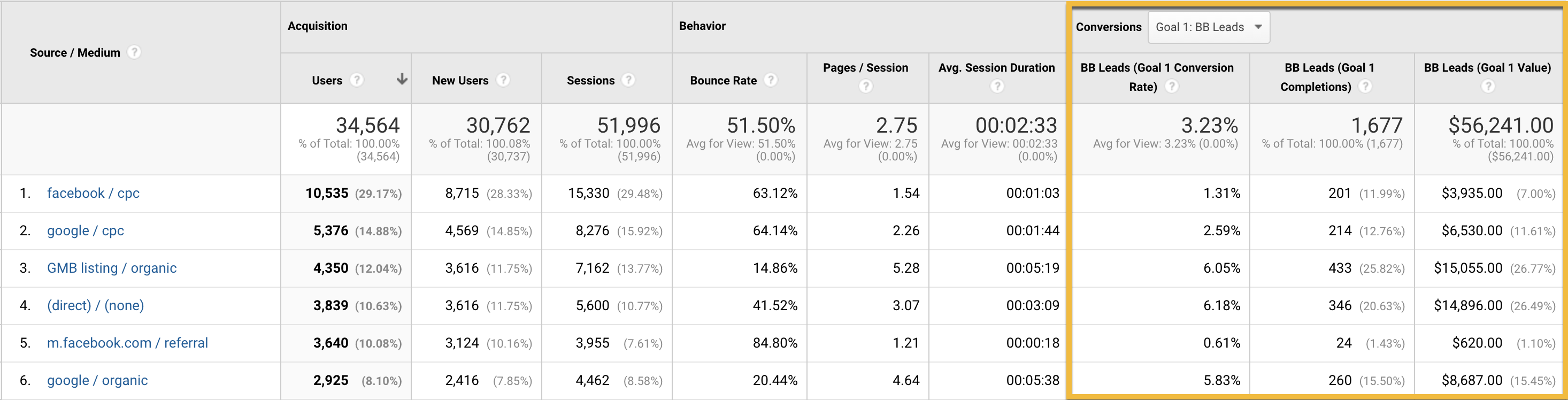
How GA4 Connects
BuyerBridge connects the client's existing GA4 property during Google channel onboarding. Once connected, GA4 becomes the source for the client's Google conversion events, and it feeds the performance you see in reporting.
💡 Note: For Google, GA4 handles conversion tracking on its own, so the EventFlow pixel is not required for Google campaigns the way it is for some other channels.
What GA4 Tracks
GA4 records the on-site actions that matter for automotive, including:
- Phone calls (the click_to_call event)
- Form submissions (the lead_submission event)
- Chat leads (the chat widget's conversion event)
- General on-site activity, like page views and sessions, used for reporting
💡 Note: New GA4 events can take 24 to 48 hours to start showing, so if you just finished onboarding, give the data time to appear.
How GA4 Feeds Conversions
During onboarding, BuyerBridge reads the client's GA4 events and turns them into the account's conversion goals, the actions Google Ads optimizes toward. Because dealers often fire the same action from two sources, BuyerBridge also flags duplicates and has you choose one primary source, so a lead is counted once, not twice.
For the full detail on conversion goals, primary sources, and de-duplication, see How Google Conversion Tracking Works in BuyerBridge.
Where GA4 Data Shows Up
Once GA4 is connected, its data appears in BuyerBridge alongside Google Ads and Search Console:
- On the dashboard, blended into KPIs and the funnel
- In conversion reporting, as the leads your Google campaigns generate
Related Articles
- How Google Conversion Tracking Works in BuyerBridge
- How to Onboard a Client's Google Channel in BuyerBridge
- Google Tools 101: Starting Guide