![BuyerBridge_LOGO-dark-2.png]](https://support.buyerbridge.com/hs-fs/hubfs/BuyerBridge_LOGO-dark-2.png?height=40&name=BuyerBridge_LOGO-dark-2.png)
AI Visibility asks AI assistants the questions car shoppers ask about dealers in your client's market, every day. It shows how often your client gets named, where it ranks against local competitors, and which pages would help it show up more.
Quick Links
- What Is AI Visibility?
- How to Find AI Visibility in BuyerBridge
- How AI Visibility Works
- The Four Tabs
- Best Practices for AI Visibility
What Is AI Visibility?
Shoppers now ask ChatGPT, Claude, Gemini, Perplexity and Google which dealer to visit. AI Visibility tracks those answers for each client. It measures whether the client is named, where it lands in the answer, what the answer says about it, and which sites the assistant cited.
AI Visibility is BuyerBridge’s GEO tool. GEO stands for generative engine optimization: the work of getting a business named in AI answers.
How to Find AI Visibility in BuyerBridge
- Log in to BuyerBridge.
- Select your client in the account switcher at the top of the page.
- In the left menu, select AI Visibility.
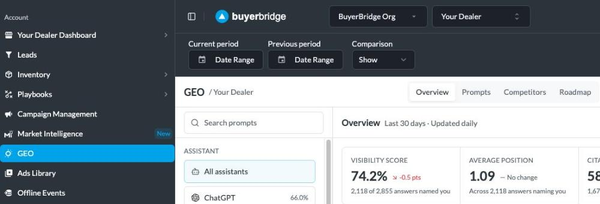
You land on the Overview tab. The four tabs across the top are Overview, Prompts, Competitors and Roadmap. The panel on the left filters every tab by assistant, prompt scope, topic and intent.
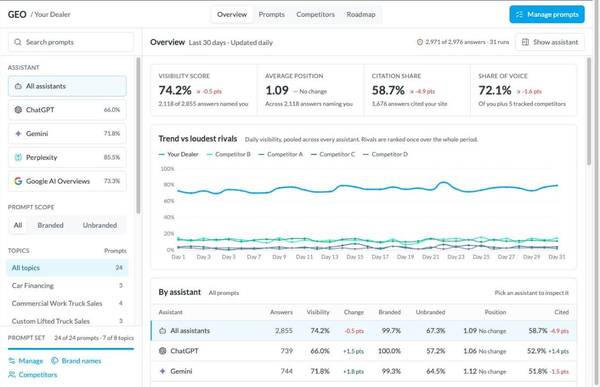
Tip: AI Visibility shows a lot of data. Collapse the BuyerBridge sidebar with the toggle next to the logo to give the page more room.
Note: Your client’s own BuyerBridge logins can open AI Visibility too.
How AI Visibility Works
- Prompts are built for your client. At setup, AI Visibility writes prompts from your client's website, its Google Search Console data if it's connected, and search data on the terms it ranks for and the ones it doesn't. Prompts are grouped by topic, like Car Financing or Used Vehicle Sales.
- The assistants get asked every day. AI Visibility runs every tracked prompt on ChatGPT, Gemini, Perplexity and Google AI Overviews.
- Prompts run from your client's city. Each prompt is asked as a shopper in your client's area, so the answers match what local shoppers see.
- Every answer gets read. AI Visibility records whether your client was named and in what position, which competitors were named, whether the tone was positive, neutral or negative, and which sites were cited.
- Results trend over time. Scores pool every answer in the date range and compare it to the period before, so one odd answer doesn't move the number.
🔗 Read more: How to Set Up AI Visibility Prompts and Competitors
The Four Tabs
- Overview: Visibility Score, Average Position, Citation Share and Share of Voice, plus the trend against your loudest rivals, sentiment, Google AI Overviews and a crawlability check.
- Prompts: every tracked prompt in one list. Open a prompt to read each assistant's full answer.
- Competitors: share of voice and visibility by topic for your client and the rooftops it's measured against.
- Roadmap: the pages worth writing or fixing, with a brief for each one you can hand to an AI assistant.
🔗 Read more: How to Read the AI Visibility Overview and Prompts Tabs
🔗 Read more: How to Use the AI Visibility Roadmap to Plan Pages
Best Practices for AI Visibility
- Ask your client which dealers they lose deals to, and add those as competitors before you read share of voice.
- Review the prompt list after setup. Uncheck prompts that don't match what your client sells.
- Filter to Unbranded prompts first. Branded prompts name the dealer, so they almost always score high.
- Check the crawlability card on the Overview before planning content. If AI crawlers can't read the site, new pages won't get cited.
- Work the Roadmap one page at a time, then add each published page to the Page tracker.
- Compare month over month, not day to day. AI answers vary from run to run.
Next Steps
Start with setup, then learn the reports.