![BuyerBridge_LOGO-dark-2.png]](https://support.buyerbridge.com/hs-fs/hubfs/BuyerBridge_LOGO-dark-2.png?height=40&name=BuyerBridge_LOGO-dark-2.png)
What changed?
BuyerBridge partners can now view billing and invoices directly inside the app.
You can now go to:
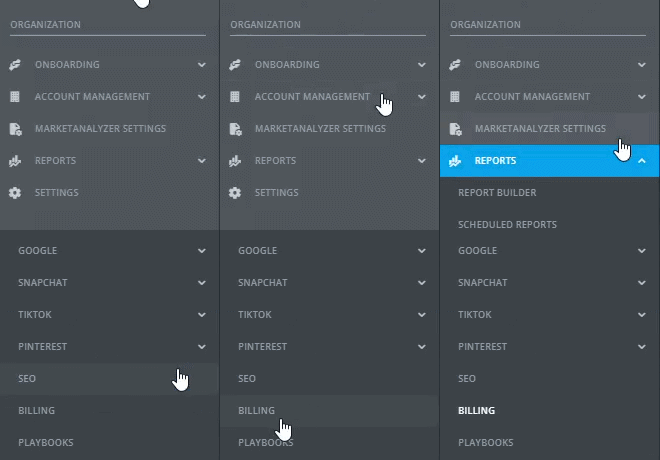
Reports > Billing
From there, you can review:
- Invoice history
- Billing details by month
- Billed products
- Payment status
- Paid dates
- Payment-method management when available
This update is for BuyerBridge partner billing only. It does not affect how agencies bill their own clients.
What this means for partners
Billing visibility is now built into BuyerBridge, so it is easier to review invoices and billing activity in one place.
Partners may also be able to add, update, or manage a payment method directly in the platform, depending on account setup.
Available payment options include:
- ACH bank transfer — no processing fee
- Credit card — 3% service fee
If a credit card is used, the 3% service fee will be shown during the payment flow.
If payment setup is not completed in-app, BuyerBridge may send a secure payment link to help complete setup.
Is anything changing with invoice delivery?
No major disruption.
Invoices will continue to be generated as part of the normal billing process.
This update gives partners a better in-app view of billing and invoices, while also supporting payment-method management inside BuyerBridge when available.
Where to find it
To access billing in BuyerBridge:
- Log in to your BuyerBridge account
- Go to Reports
- Expand the dropdown
- Select Billing
What you should do next
- Go to Reports > Billing
- Review your invoice history and billing details
- Add or update your payment method if that option is available for your account
- If needed, complete payment setup through a secure BuyerBridge payment link
A quick reminder
The Billing section is for BuyerBridge partner billing only.
It does not control dealer billing or how you charge your own clients.